
I use the Microsoft Remote Desktop Client (Version 2.0.0 Beta 3) to connect to a number of Windows machines from my Mac laptop.
There is one very annoying ‘feature’ when using the Remote Desktop Client with a MacBook with a UK Keyboard – Whenever you use shift + arrow to highlight text, the Remote Desktop Client sends a delete signal and deletes one character to the right of the cursor.
I’ve since found a very useful fix for this – Set your keyboard layout to US.
There is only one key combination change which is that hash and pound (As in the currency) are reversed – Shift + 3 will do a hash and Alt + 3 will do a pound. This does have another benefit… when using the RDP Client on a UK Mac keyboard, you do not have access to the hash character.
You have the ability to add an icon to quickly change the layout from the menu bar.
Here is how you do it.
1. Open System Preferences and Select International
2. Select the Input Menu Tab
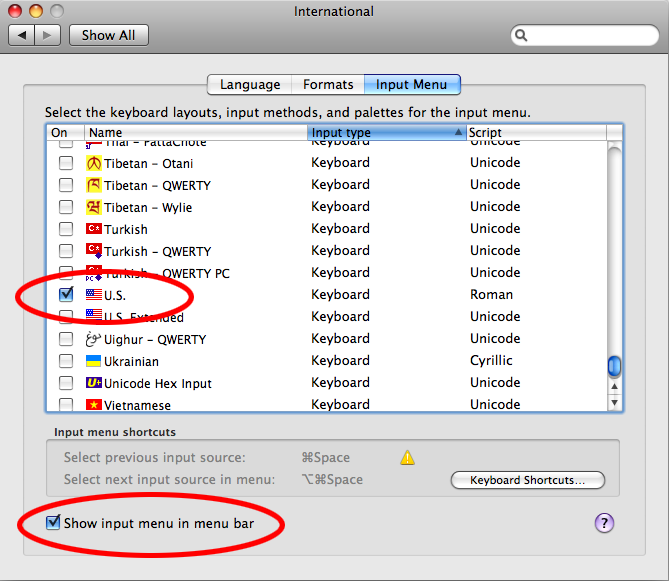
3. Scroll down the list and tick U.S. and then at the bottom of the window select Show input menu in menu bar (Screen grab below)
4. Close the international tab.
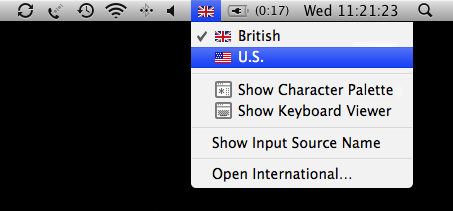
5. You should now have a picture of a flag in your menu bar. If you click it you can quickly change between the UK and US keyboard layouts. (Screen grab below)
As said earlier, the only layout change for common keys is that hash(#) and pound (£) are swapped.
Let me know if this makes your life easier.

